


SmartPc Cleaner: Free PC Cleaner for Windows
Clean Smarter. Perform Better.
A free desktop utility from Croopple Tech that clears temporary files, browser cache and other junk, manages the Recycle Bin and Downloads folder, scans the registry for leftovers and shows live CPU, memory and disk usage.
- FreeNo cost to download
- Windows64-bit (x64) desktop app
- MSI & EXEChoose your installer
- Croopple TechDeveloper & publisher
Download SmartPc Cleaner for Windows
Pick the installer that suits you. Both install the same SmartPc Cleaner 2.0.0 for 64-bit Windows, directly from Croopple Tech.
Windows installers
Available for Windows (64-bit)SmartPc Cleaner is currently available for Windows.
MSI Installer
Windows Installer Package
Installs for all users of the PC (administrator permission required). Suits IT administrators and managed deployments.
- Version
- 2.0.0
- File size
- 3.5 MB
- System
- Windows, 64-bit (x64)
- File name
- SmartPc-Cleaner-2.0.0-x64.msi
SHA-256 checksum
6829e642d2f63a290bd1d3d946a959d18dd091459413e66ed92865c5c1370485
EXE Installer
Standalone Windows Installer
A guided setup program. The simplest choice for most home users.
- Version
- 2.0.0
- File size
- 2.6 MB
- System
- Windows, 64-bit (x64)
- File name
- SmartPc-Cleaner-2.0.0-x64-Setup.exe
SHA-256 checksum
f38a1740bb8a7ad1d721c367b06884876c42ce0229ee5140fc0cbc6a96f0fe09
By downloading or installing SmartPc Cleaner you agree to the End User License Agreement and confirm you have read the Privacy Policy and Download & Use Disclaimer. The installers are not yet code-signed, so Windows SmartScreen may ask you to confirm before running them; here is how to check a download.
Everything SmartPc Cleaner Does
A Windows PC cleaning software with clearly separated tools: cleaning, system maintenance and a live view of how your PC is doing. Here is what version 2.0.0 includes.
Clean
PC Scan
Finds temporary, cache and log files across the system in one scan, shows what it found, and lets you choose what to clean.
Junk Files
Cleans your temp folder, the Windows temp folder, the system web cache, DirectX shader cache, crash dumps, Windows error reports and Windows Update logs, only for files older than an age you choose.
Browser cleanup
Clears cache, cookies and history for Google Chrome, Microsoft Edge, Mozilla Firefox, Brave, Opera, Opera GX, Vivaldi and Chromium, profile by profile.
Recycle Bin
See exactly what is in the Recycle Bin, restore individual items to where they came from, or empty it.
Downloads
Review the files and folders in your Downloads folder and tidy them up. Anything you remove goes to the Recycle Bin.
System
Registry scan
Looks for leftover entries: uninstall entries for missing programs, missing shared DLLs, missing COM servers, broken App Paths and empty file types. A backup is saved before anything is removed.
Optimization tools
One place to open Windows' own maintenance tools: Disk Cleanup, Storage Sense, Optimize Drives, Performance Options, Startup apps, System File Checker (SFC) and DISM repair.
System Info
Processor, memory, drives, network adapters, Windows version and uptime of your PC, on one screen.
Add Devices
Quick shortcuts to Windows settings for printers and scanners, Bluetooth devices and linking your phone.
Monitor & history
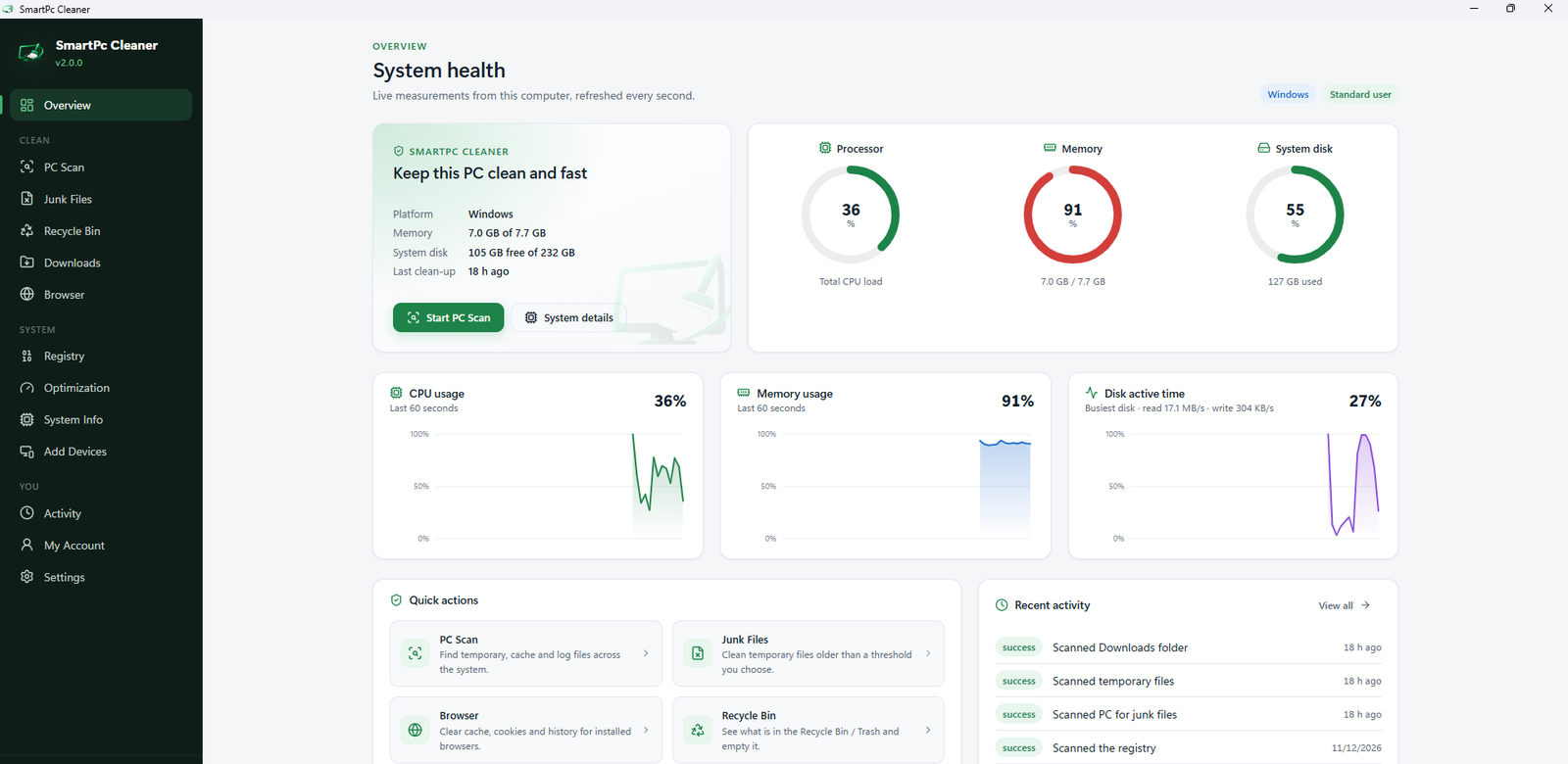
Live system overview
Processor load, memory use and disk activity for the last 60 seconds, refreshed every second, plus free space on your system drive.
Activity history
Every scan and clean-up is recorded with its result, so you can see what was done and when, and export the history.
Built to be careful
A cleaner should never surprise you. SmartPc Cleaner shows what it found before cleaning and keeps a way back.
- Backups first: browser data and registry entries are backed up before cleaning, and can be restored inside the app.
- Recycle Bin, not permanent deletion: for your Downloads folder.
- Open browsers are skipped: so the cleaner never edits a browser while you are using it.
- Recent files are left alone: junk cleaning only removes files older than the age set in Settings.
Up and Running in Three Steps
-
Step 1: Download
Download the installer you prefer: the MSI package or the EXE setup. Both install the same SmartPc Cleaner 2.0.0.
-
Step 2: Install
Open the downloaded file on your 64-bit Windows PC and follow the installer. Windows may ask for permission to make changes; choose Yes.
-
Step 3: Start using
Open SmartPc Cleaner from the Start menu. Start with PC Scan on the Overview screen, then explore Junk Files, Browser, Registry and the other tools.
See SmartPc Cleaner on Windows
Real screens from SmartPc Cleaner 2.0.0, not mock-ups.
A Straightforward PC Cleaner from a Team You Can Reach
One free Windows app, two genuine installers and a company you can actually contact.
Developed by Croopple Tech
Built and published by Croopple Tech, the New Delhi team behind custom software development and websites for businesses.
A simple Windows desktop utility
Clear sections for each job (Clean, System and Activity), so you always know what a tool will touch.
Free download
Download SmartPc Cleaner at no cost from this official page.
MSI and EXE installer options
A Windows Installer package for administrators and a guided setup for everyone else, each with a published SHA-256 checksum.
Product support through Croopple Tech
Questions about installing or using the app? Contact Croopple Tech directly.
What You Need to Run SmartPc Cleaner
| Operating system | Windows, 64-bit (x64). SmartPc Cleaner is not available for macOS or Linux yet. |
|---|---|
| Required component | Microsoft Edge WebView2 Runtime. It comes with Windows 11. If it is missing, the MSI installer downloads it automatically (internet connection needed). |
| Disk space | About 8 MB for the program itself, plus a little space for its settings, activity history and backups. |
| Installer permissions | The MSI installs for all users and needs administrator permission. |
| Administrator rights in the app | Optional. Some system-wide locations (for example the Windows temp folder) can only be cleaned as administrator; the app can restart itself with administrator rights when you ask it to. |
| Current version | 2.0.0 |
Need help?
Croopple Tech supports SmartPc Cleaner directly. Tell us your Windows version and which installer you used.
Contact supportSmartPc Cleaner Questions
SmartPc Cleaner is a free Windows desktop utility developed by Croopple Tech. It helps you remove temporary and junk files, clear browser cache, cookies and history, manage the Recycle Bin and your Downloads folder, scan the registry for leftover entries, and keep an eye on processor, memory and disk usage.
Yes. SmartPc Cleaner is free to download from this official Croopple Tech page, as an MSI or an EXE installer.
Go to the download section on this page and choose Download MSI or Download EXE. Open the downloaded file on your Windows PC and follow the installer. SmartPc Cleaner requires 64-bit (x64) Windows.
Both install the same version of SmartPc Cleaner. The MSI is a Windows Installer package: it installs the app for all users of the PC, asks for administrator permission, and suits IT administrators who deploy software with standard Windows tools. The EXE is a standalone setup program with a guided installer, which most home users find simplest.
Not yet. SmartPc Cleaner for macOS is coming soon. Currently, SmartPc Cleaner is available for Windows.
Not yet. SmartPc Cleaner for Linux is coming soon. Currently, SmartPc Cleaner is available for Windows.
SmartPc Cleaner is developed and published by Croopple Tech, a software and website development company based in Mangolpuri, New Delhi. Learn more about Croopple Tech.
Use the contact page, email info@crooppletech.com or call +91 93155 30224. Tell us your Windows version, the installer you used (MSI or EXE) and what happened.
Give Your PC a Clean Start
Download SmartPc Cleaner 2.0.0 free, run a PC Scan and see what is taking up space.
Need software built for your business? See Croopple Tech's software development services.
